
|

The StarSim Simulation Engine |
||
|
The StarSim Simulation Engine is a computational tool that performs a
simulation operation for a model system.
The data space can become quite large and complex, and the mass of digital
data that are generated are not usually amenable to direct interpretation
by a human operator.
Instead, the operator controls the parameters of the simulation and views
the results through the use of one (or more) StarSim visualization tools.
These tools provide a graphical user interface (GUI) that is tailored
specifically for the application.
The particular simulation that is shown below is an example of how a client can model and predict the progress of a bioattack that employs one or more nerve agents. In practice, it would represent the targeted area and environs using a satellite image, a map, or a topographic map, as selected by the operator. The StarSim screen images shown here are derived from a demonstration version of the program which uses approximations instead of actual real time data. (Note: These images have been reduced from the original for convenience. The actual panes are approximately 25% larger than the images shown here.)
The operational StarSim system allows the operator to select any location in the United States for analysis. Due to space limitations, the demonstration version of the program is fixed at an area of Austin, Texas bounded by The University of Texas campus on the south, the St. John's Rd. neighborhoods north, IH-35 and the old Mueller airport site on the east, and Mopac Freeway and its environs on the west. (The satellite image data shown here are obsolete. The client would doubtless wish to use more recent satellite imagery or possibly proprietary mapping data. Provision has been made in StarSim for the use of real time satellite images and other online map sources.) In an operating environment, the current conditions at the target location are imported from online NOAA and other governmental sources; this demonstration program allows the operator to specify the current conditions at the designated location. In this example, the operator has specified a single event (beginning at time t=0.00) that simulates contamination with Tabun; at this point in the simulation, one hour and 15 minutes have elapsed since the original contamination event. The operator may use the "Rewind" button to return to time t=0.00 in the current configuration, or "Restart" to reinitialize the simulation completely. The operational StarSim program will fetch online census data to enable it to make estimates of casualties in the contaminated areas; the demonstration program has no such capability. At the 1:15 hour mark in this example (see the control panel, above), the area of contamination has expanded as shown on the satellite image below. 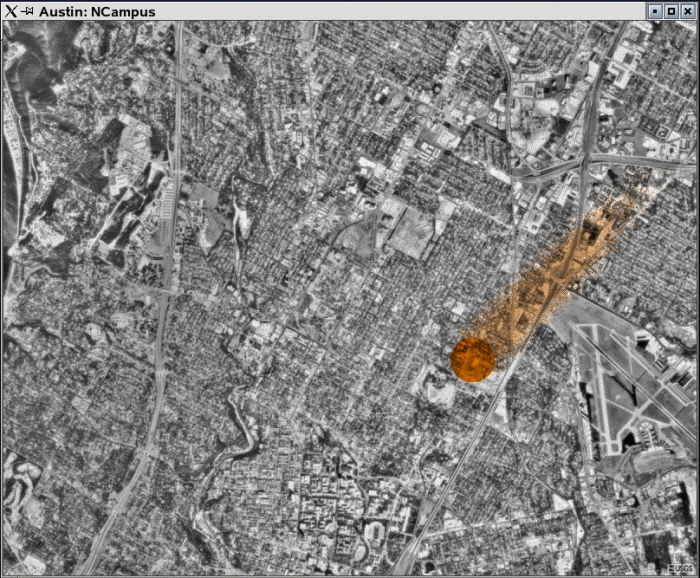
The intense colored circle area denotes the area of initial contamination, as defined by the operator; the smeared colored area denoted the area into which the contamination has expanded due to wind conditions. The operational program allows the operator to click at selected points in the image to determine the density of contamination, as predicted by the Simulation Engine. |
|||

Copyright 2016 by Lone Star Biotechnologies.
All Rights Reserved.